August 16, 2026 • Declan Merritt • 11 min reading time • Prices verified June 17, 2026
Camera Cage and Accessory Mount Strategy: Cold Shoes, NATO Rails, and Magic Arms Explained for Real Rigs
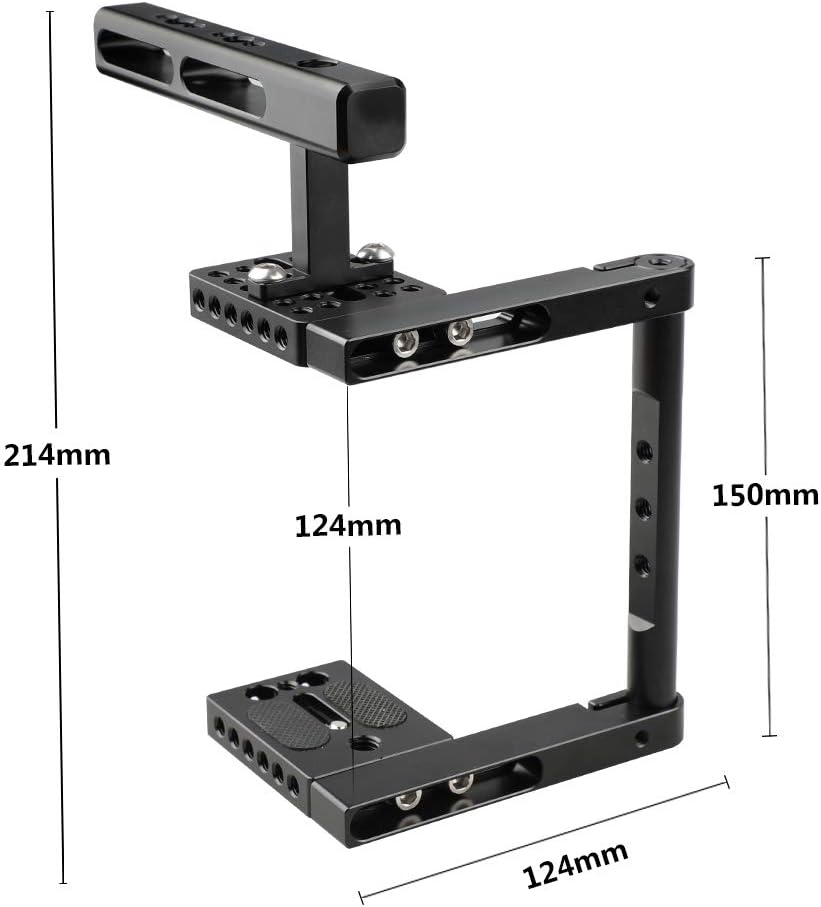
You’re building a camera rig — which means you’re about to bolt, clamp, and screw accessories onto your camera body that the camera itself was never designed to hold. A camera cage is the metal frame that wraps your camera and gives you a grid of mounting points to attach things: monitors, microphones, wireless transmitters, follow-focus systems, and lights. Those mounting points come in three main flavors. A cold shoe (the small rectangular slot you’ve seen on top of cameras forever) is the simplest and most universal. A NATO rail (a standardized aluminum rail with a locking clamp) is faster and more secure for heavier accessories. And a magic arm (an articulating arm with ball joints at each end) lets you position something — usually a monitor — in exactly the right place, at any angle, and lock it there with a single knob. The goal of this guide is to tell you which mount to reach for, when, and why the wrong choice costs you time on set.
Once you’ve got a deal in motion and you’re spec’ing out a rig, accessory mounting stops being theoretical. You’re buying parts that need to work together on a specific camera, with specific accessories, on a specific kind of shoot. The decisions below are meant to help you make those calls with a clear framework.
Cold Shoes: Where to Start, and Where to Stop
The cold shoe is the lowest barrier to entry in accessory mounting. Nearly every cage ships with at least two or three cold shoe slots, and almost every on-camera accessory — microphones, small LED lights, wireless receivers — has a cold shoe foot. For lightweight accessories under roughly 150–200 grams, cold shoe mounting is fast, portable, and completely adequate.
The problem starts when you push past that weight threshold, or when you need precise angular positioning. Cold shoes are fixed-angle by design. The accessory sits flat or at whatever angle the shoe is machined to. There’s no articulation, no height adjustment, and no easy way to angle a monitor toward an operator who’s standing at a non-standard position relative to the camera. For a microphone or a small wireless receiver, that rigidity is fine. For a 5- or 7-inch monitor, it becomes a real limitation on anything other than a locked-off tripod shot.
A more critical failure mode: cold shoe retention under vibration. Owners of shoulder rigs consistently report that accessories walk loose from cold shoes during extended handheld takes, particularly when the rig is carrying a follow focus and the operator’s hand movements transmit vibration through the entire system. A locking cold shoe (with a thumbscrew or side-tightening bolt) solves this, but it adds a step to every setup and every breakdown.
The editorial consensus at Cinema5D’s cage roundup coverage is consistent here: cold shoes are workhorses for static, lightweight accessories; they’re a liability for anything you’ll be repositioning frequently or anything heavier than a small monitor.
Cold shoe is the right call when: the accessory is light, you don’t need angle adjustment, and speed of attachment/detachment matters more than rock-solid rigidity.
NATO Rails: The Working Standard for Monitor and Handle Mounts
A NATO rail is a 15mm-wide aluminum rail (standardized to NATO STANAG dimensions, though the camera industry’s adoption is loosely derived from that original military standard) with a machined slot that accepts a NATO clamp. The clamp slides on, locks with a screw or lever, and doesn’t rotate or loosen under load the way a cold shoe can.
For monitors and handles on a run-and-gun rig, NATO rail has become the practical standard. ProVideoCoalition’s coverage of run-and-gun mounting systems notes that the combination of a cage with a top NATO rail and a quick-release NATO clamp is now a near-universal configuration among documentary and commercial shooters precisely because it allows one-handed release, repositioning, and reattachment without tools.
The key advantage over cold shoe is lateral sliding. You can position a monitor clamp anywhere along the rail’s length, which means you can balance the rig’s center of gravity as accessories are added or removed — a practical benefit that’s easy to undervalue until you’re shooting handheld for four hours.
For gimbal work specifically, the NATO clamp-based monitor mount has earned strong operator praise because it survives the vibration profiles that a gimbal generates during active stabilization. Owners of DJI RS 4 and RS 3 Pro rigs consistently cite the quick-release NATO system as essential for getting a monitor on and off the gimbal handle quickly between setups — something a cold shoe mount doesn’t allow at the same speed.
NATO rail is the right call when: you’re mounting a monitor or handle, you need quick-release capability, or you’re working on a gimbal where attachment and detachment speed matters.
Magic Arms: Positioning Power and When You Actually Need It
A magic arm is two rigid arm segments connected by ball joints, with a locking mechanism — typically a single central knob — that freezes both joints simultaneously when tightened. The result is that you can position the arm in three-dimensional space, lock it, and trust that it stays exactly there. For monitor work, this is the capability that cold shoes and NATO rails can’t replicate: you can angle the monitor toward a director sitting at 45 degrees to the camera, or tilt it up toward an operator’s eye line on a low-angle rig, or swing it entirely out of the way during a lens swap.
SmallRig’s articulating magic arm has become a reference product in this category. Owners consistently praise the single-knob tightening mechanism, with multiple long-run reviewers noting they’ve purchased the same arm across multiple studio setups specifically because the single-point lock is reliable and fast. This isn’t a minor ergonomic point — a two-knob arm requires two hands to lock, which means you’re setting down something else every time you adjust the monitor. Single-knob design matters on a working set.
Size matters more than you’d expect. Reviewers of the 7-inch rosette version of the SmallRig magic arm consistently report that the smaller arm is more practical for monitor work than longer variants. A longer arm introduces more flex under load and more vibration susceptibility during handheld shooting. For a 5-inch or 7-inch monitor, a compact magic arm gives you the positioning range you need without the wobble penalty.
Can a magic arm hold an iPad or tablet?
This is a real question with a nuanced answer. Published specs on most 7-inch magic arms rate them for loads in the 1–2 kg range. A standard iPad (around 460–500 grams) sits well within that envelope on paper. However, operators in long-run reviews consistently note that tablet mounting introduces a leverage problem: the larger footprint of a tablet creates a moment arm that amplifies any micro-vibration, and even a rated arm can show visible wobble on a 10-inch tablet in a way it won’t on a compact monitor. For iPad-as-monitor use cases, a dedicated tablet cage with its own mounting foot — rather than relying on the magic arm’s ball joint alone — is the more stable solution.
By the numbers:
| Mount type | Typical weight ceiling | Repositionable? | Quick-release? | Best for |
|---|---|---|---|---|
| Cold shoe | ~200g | No | Yes (basic) | Mics, small receivers, LEDs |
| NATO clamp | ~500–800g | Lateral slide only | Yes (lever/screw) | Monitors, handles, gimbal accessories |
| Magic arm | ~1–2 kg (rated) | Full 3D articulation | No | Monitors requiring angle control |
Rods, Follow Focus, and Whether You Actually Need a Cage First
One of the most common mid-build questions: do I need a full cage to run 15mm rods and a follow focus? The short answer is no — not always. A rod support that clamps to the camera’s baseplate or tripod quick-release plate can get you 15mm rods without a full cage surrounding the camera body. This matters for shooters who want a lighter footprint and don’t need the top and side mounting real estate a cage provides.
That said, a cage earns its place quickly once you add a second or third accessory. CAMVATE’s multi-piece cage design — which requires assembly but lets you run only the sections you need — addresses this directly. Reviewers who own CAMVATE rigs specifically cite the modular approach as an advantage: you can run a half-cage (baseplate + top handle bar) for a light documentary day, and add the side rails when you need follow focus and a matte box on the same rig. No Film School’s rig-building coverage consistently identifies this kind of modularity as the differentiator between cages that grow with a production and cages that become dead weight.
The cable management problem nobody warns you about: once you stack a monitor, a follow focus motor, and a wireless transmitter on a caged rig, cable routing becomes the primary friction point in your daily setup. Operators in shoulder rig reviews consistently identify this as the challenge that outlasts every other complaint. The practical fix is building cable routing into your rig plan before you buy — not retrofitting zip ties after the fact. This means choosing a cage with dedicated cable management channels or routing clips, and treating accessory cable length as a spec that matters as much as the mount type.
The Decision Framework: If X, Then Y
Here’s the explicit decision tree based on the patterns above:
- If the accessory is light (mic, small LED, wireless receiver) and you don’t need angle control → cold shoe, ideally a locking variant.
- If you’re mounting a monitor on a gimbal or need fast one-handed release → NATO rail clamp, full stop.
- If you need a monitor angled toward a director, offset operator, or non-standard eye line → compact magic arm (7-inch or smaller), single-knob locking design.
- If you’re adding a follow focus and rods → you don’t need a full cage first, but you’ll want one within one or two accessory additions.
- If you’re building a multi-accessory shoulder rig → plan cable management before you finalize the cage purchase; a modular cage design pays for itself in daily setup time.
Frequently Asked Questions
Can I mount a 7-inch monitor on a cold shoe alone, or do I need a magic arm? A cold shoe can physically hold a small 7-inch monitor if the monitor has a cold shoe foot, but you’ll get no angle adjustment and increased wobble risk under vibration. For a fixed, locked-off setup, it works. For handheld or gimbal work, a NATO clamp or magic arm is a meaningful upgrade in stability and positioning flexibility.
What is the difference between a NATO rail mount and a cold shoe mount for monitors? Cold shoe mounts are fixed-angle and rely on friction or a single thumbscrew. NATO rail mounts use a machined clamp that locks onto a standardized rail, allowing lateral repositioning along the rail and faster one-handed attachment/detachment. NATO is the stronger, faster, and more repositionable system for monitor mounting.
Will the SmallRig magic arm hold an iPad or tablet securely? Within its rated load spec, yes — but tablet size introduces vibration and leverage issues that reviewers consistently flag even on rated arms. For serious tablet-as-monitor use, consider a dedicated tablet holder with its own mounting interface rather than relying solely on the magic arm’s ball joint.
Do I need a camera cage to use 15mm rods and a follow focus? No. A baseplate with rod clamps can support 15mm rods independently. A cage adds top and side mounting real estate for additional accessories, which most operators find they need within one or two additions.
How do I prevent my monitor from rotating or drooping on an articulating arm? Two factors: locking mechanism quality and arm length. Single-knob arms that freeze both joints simultaneously hold better than sequential-lock designs. Shorter arms have less flex and less leverage working against the lock. If drooping persists, check that the knob is fully tightened and that the mount point (cold shoe or rosette) is itself secure — a loose base connection undermines even a good arm.
Your next step: If you’re spec’ing a monitor mount for a gimbal rig right now, the NATO clamp system is the starting point worth evaluating — specifically the SmallRig quick-release NATO clamp designed for RS-series gimbals. If you’re building a shoulder rig from scratch, the CAMVATE modular cage and SmallRig’s compact magic arm are the two products reviewers return to most consistently across long-form builds. Start with the mount type that matches your primary accessory, and build outward from there.