August 21, 2026 • Declan Merritt • 10 min reading time • Prices verified June 17, 2026
Motorized Camera Dolly vs Slider: Which Actually Moves Your Shots Forward
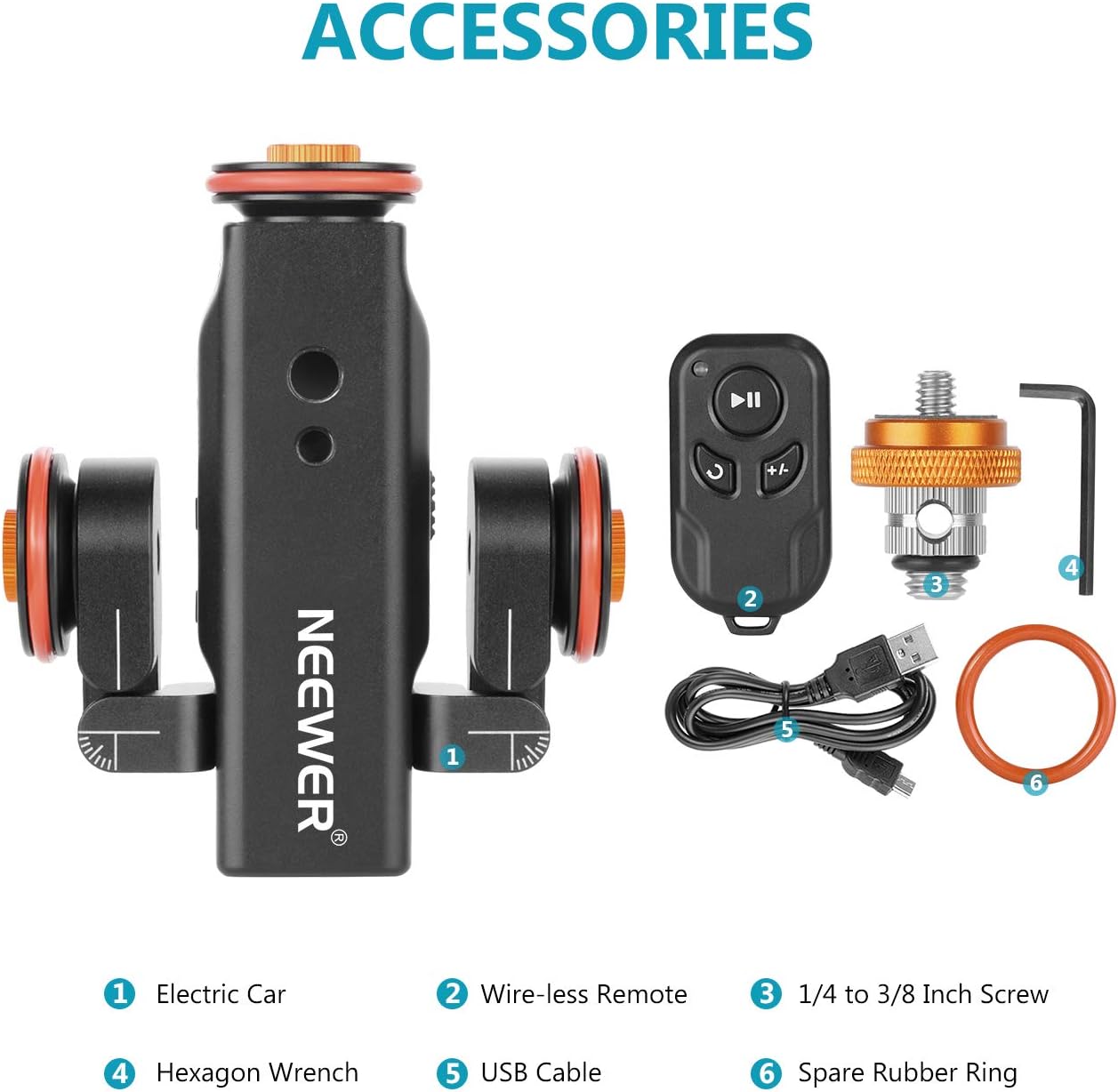
If you’ve ever watched a film scene where the camera glides smoothly alongside a subject — tracking them down a hallway, creeping into a product on a tabletop, or pulling back to reveal a wide environment — you’ve seen either a dolly or a slider at work. A motorized camera dolly is a wheeled platform that rolls your camera across a floor or surface on its own wheels, no track required. A motorized slider is a camera carriage that travels back and forth along a fixed rail, typically mounted on a tripod or set of legs. Both tools create that cinematic gliding motion that handheld shooting simply can’t replicate. But they solve different problems, carry different limitations, and cost you differently — in money, in setup time, and in creative flexibility. If you’re currently deciding between the two for a live project, this article names the tradeoffs directly and ends with a clear decision rule.
| EDITOR'S PICKGVM 48"/120cm Motorized Camera… | Mid-tierGVM Great Video Maker Camera Mo… | Budget pickNeewer 3 Wheels Wireless Video… | |
|---|---|---|---|
| Type | Motorized slider | Motorized slider | Motorized dolly |
| Length | 48"/120cm | 48"/120cm | — |
| Material | Carbon fiber | — | — |
| App control | ✓ | — | — |
| Remote control | — | — | ✓ |
| Battery included | — | ✓ | — |
| Price | $269.00 | $269.00 | $73.89 |
| See on Amazon → | See on Amazon → | See on Amazon → |
The Core Difference Isn’t Price — It’s Constraint
Most comparison articles position these two tools as budget tiers. That framing is wrong, and it leads to the wrong purchase.
A motorized dolly and a motorized slider are genuinely different production tools with different operational constraints. The choice isn’t really “how much do you want to spend” — it’s “what does your shooting environment actually allow, and what kind of motion serves your shot?”
Dollies give you freedom of direction. You can push forward, pull back, track laterally, or arc around a subject. You are not constrained to a single axis. The tradeoff: you are completely at the mercy of your floor. As No Film School notes in their camera movement guide, surface conditions determine everything on a wheeled dolly — a textured mat, a slightly bowed hardwood plank, or fine grit on a studio floor will introduce vibration that no amount of post-stabilization fully rescues.
Sliders give you a controlled, repeatable axis of motion — typically horizontal, sometimes vertical with the right rig — with the rail itself providing the stability guarantee. You know exactly where the camera starts and ends. The constraint is that the motion path is fixed: you get one axis per setup, and the distance is capped by your rail length.
Neither is universally superior. The real question is which constraint you can live with on your specific shoot.
Surface Is the Dolly’s Hidden Deal-Breaker
Reviewers of consumer-tier motorized dollies consistently identify the same friction point: “smooth surface” isn’t a suggestion — it’s a non-negotiable technical requirement. Owners report failed shots on floors that look smooth, particularly lightly textured concrete, older studio floors with minor warping, and any surface with seams. The pattern across aggregated owner reports is unambiguous: on truly smooth, clean floors — polished concrete, glass, sealed hardwood — wheeled dollies earn genuine praise for surface versatility and affordability. The moment the floor becomes questionable, the shots become unusable.
This matters more than it sounds in practice. Consider your typical shooting day: client conference rooms, unfamiliar studio rentals, location shoots in retail spaces or residential interiors. Unless you’re working in a controlled environment you’ve pre-walked and verified, you’re gambling on the floor every time you pull out a wheeled dolly.
The practical workaround some operators use is a portable section of melamine or foam-backed vinyl — essentially a personal clean floor you bring with you. That works. It also adds weight to your kit and a setup step to your day. Factor that into the decision.
StudioBinder’s camera dolly guide makes the useful point that professional production dollies solve this problem with track (the Dana Dolly system, for instance), but consumer-tier motorized dollies trade track-dependency for portability — and surface sensitivity is the price of that trade.
Budget-Tier Dolly: Neewer 3-Wheel Motorized Dolly
The Neewer 3-wheel motorized dolly is the entry point most solo creators encounter first. On verified smooth floors it delivers genuine value: quiet motor, simple remote operation, and a footprint small enough for tight interiors. The deal-breaker surfaces quickly on anything less than ideal flooring. Operators who pre-scout their surfaces report solid results; operators who don’t report wasted takes.
Neewer
$73.89
In stock on Amazon
Check price on AmazonSliders: The App Problem Is Real, and So Is the Motor Quality Gap
Motorized sliders have their own friction point, and it’s increasingly a software problem rather than a mechanical one.
Budget-Tier Slider: Neewer DL400 Motorized Slider
Owners of the Neewer DL400 motorized slider consistently flag the same frustration: phone-only control via app. For solo creators managing camera, talent, and exposure simultaneously, pulling out a phone to trigger a slider move is a genuine workflow interruption. The physical remote isn’t included, and operators report that the absence becomes noticeable — not in spec-sheet reviews, but in the accumulated friction of a real shooting day. If you’re working alone, phone-dependent control adds cognitive load at exactly the wrong moment.
As PremiumBeat notes in their slider buying guide, manufacturer-stated battery life and control ergonomics are frequently measured under light, intermittent use — the continuous motor operation that motivates most slider buyers draws significantly more current and exposes more workflow friction than a quick bench test reveals.
Neewer
$73.89
In stock on Amazon
Check price on AmazonMid-Tier Slider: GVM Motorized Slider
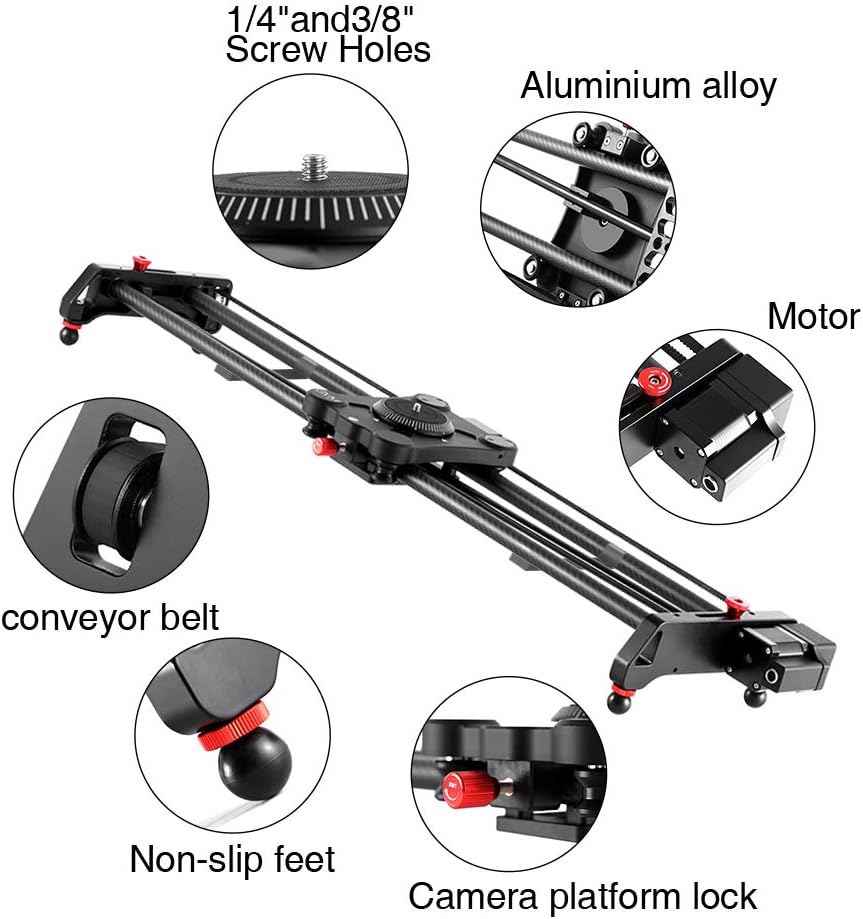
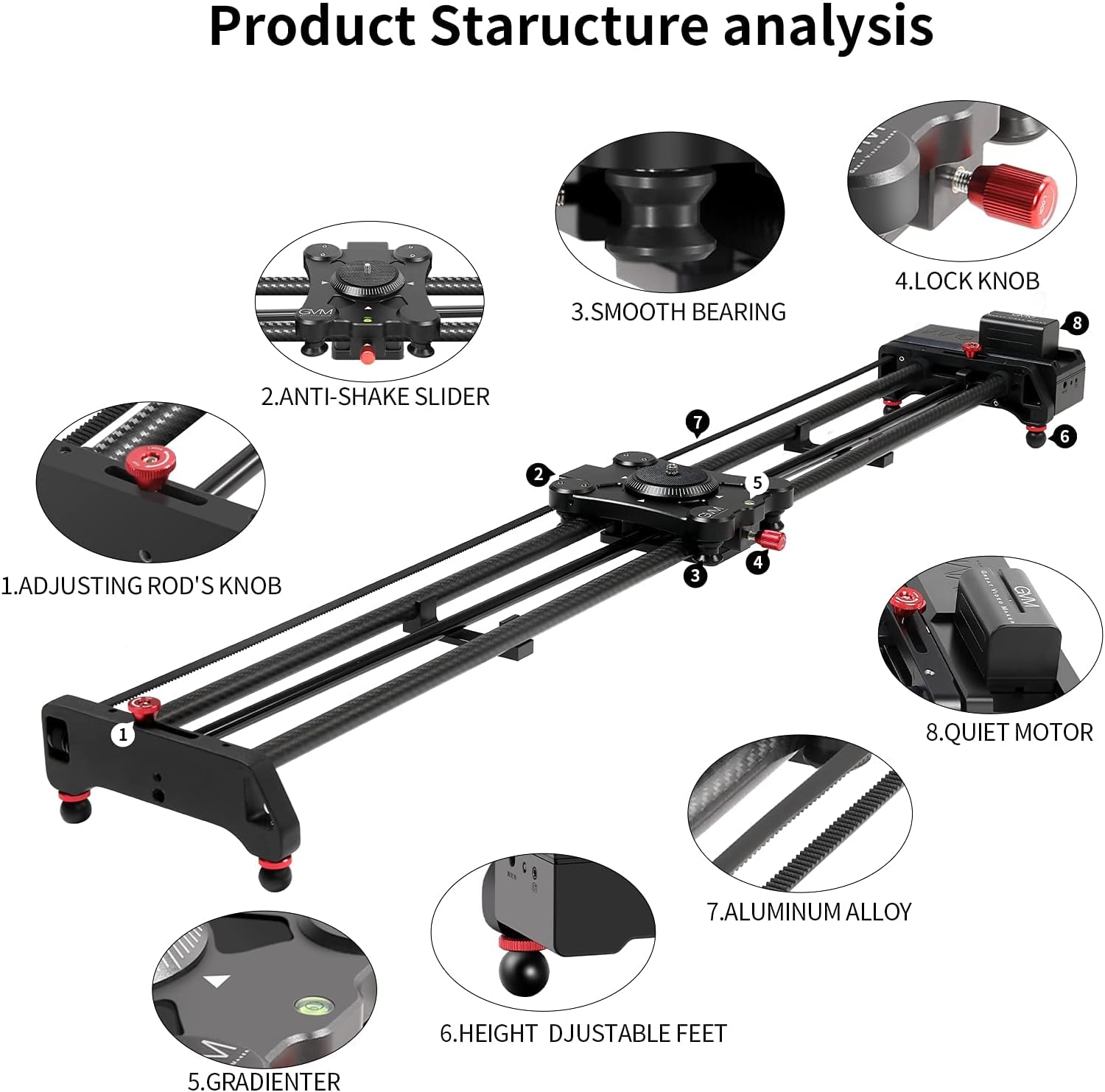
GVM slider owners report a related but different problem: the physical remote is included, but reviewers consistently describe it as feeling inexpensive and the manual as difficult to parse. The good news is that GVM’s motor itself earns genuine praise — near-silent operation and time-lapse results that operators describe as legitimately professional for the price point.
The practical question for GVM buyers is whether the slider requires the app for its full feature set. Based on owner reports, the physical remote handles basic moves without a phone, but time-lapse programming and speed ramping lean on the app. So the answer to “does GVM work without the app?” is: yes for basic operation, no for its headline features.
Battery life is the other recurring GVM flag. Owners report that three batteries are actually necessary for a full production day of continuous motor use or time-lapse sequences — real-world draw runs shorter than spec-sheet figures under those conditions. Cinema5D’s motorized slider review coverage notes this as a consistent pattern across mid-tier motorized sliders: the use cases that motivate purchase are exactly the ones that tax battery life hardest. Budget for two to three batteries from the start.
GVM
$269.00
In stock on Amazon
Check price on AmazonPremium-Tier Slider: iFootage Nano II
The iFootage Nano II occupies a different position entirely. Owners — including operators running demanding cinema glass who’ve explicitly compared it against Edelkrone — report dramatically lower micro-jitter than competing sliders in its class. When you’re running a vintage prime or a long telephoto on a motorized slider, micro-jitter is a deal-killer; it shows up as a subtle, rhythmic vibration that’s invisible on a phone monitor and devastating on a 4K timeline. The consistent pattern in long-run reviews is clear: the Nano II’s motor control is meaningfully smoother than similarly-priced competitors.
One detail that further shifts the Nano II’s value calculation in a working kit: owners report genuine, functional DJI RS gimbal integration. This isn’t a marketing bullet point — operators describe it as a workflow upgrade that changes what the combination of slider and gimbal can accomplish together.
Here’s why this matters in practice. A slider alone gives you a fixed horizontal translation. A gimbal alone gives you stabilized handheld or static-position movement. When the two are synchronized — the slider triggering the gimbal head to pan or tilt in coordination with the slide — you get compound motion: a camera that moves laterally while simultaneously reframing. That’s the kind of move that previously required a dedicated motion-control rig costing multiples of either unit. Cinema5D’s motorized slider review roundup identifies synchronized slider-gimbal setups as one of the most accessible paths to motion-control-style shots for independent filmmakers working without a dedicated operator. The Nano II’s DJI RS integration puts that capability within reach for operators already running DJI RS 3 or RS 3 Pro systems.
GVM
$269.00
In stock on Amazon
Check price on AmazonHead-to-Head: Four Tools Across the Key Variables
| Tool | Motion axes | Surface dependency | App required | Gimbal integration |
|---|---|---|---|---|
| Neewer 3-wheel dolly | Multi-directional | High — smooth floor critical | No | Not native |
| Neewer DL400 slider | Single axis (rail) | Low — rail-mounted | Yes — phone only | No |
| GVM motorized slider | Single axis (rail) | Low — rail-mounted | Partial | No |
| iFootage Nano II | Single axis (rail) | Low — rail-mounted | Partial | DJI RS native |
Can a Motorized Dolly Actually Replace a Slider for Product Shots?
This is one of the most common questions from buyers considering a dolly as a do-everything tool, and the honest answer is: rarely, and only under specific conditions.
For product shots, the requirements are control and repeatability. You need the camera to move the same way on take 2 as it did on take 1. Rail-based sliders deliver this because the rail defines the path. A wheeled dolly introduces variables — micro-variations in wheel pressure, surface texture, push speed — that accumulate into inconsistency across takes.
ProVideoCoalition’s piece on practical camera support makes the right distinction: dollies excel at presence shots (the camera moving through an environment) while sliders excel at precision shots (controlled, repeatable movement relative to a static subject). Product photography is almost always the latter. A dolly can work for product shots if your floor is perfect and your moves are short, but it’s fighting its own design to do so.
If product shots are your primary use case, a slider is the right tool. The dolly buys you something different — directional freedom in a production environment — not tabletop control.
Frequently Asked Questions
Can a motorized dolly replace a rail slider for product shots? Rarely. Dollies introduce surface-dependent variability that makes take-to-take consistency difficult. For product work — where repeatability is the job — a rail slider’s fixed path is the right tool. A dolly works if your surface is perfect and your moves are short, but it is not the optimal choice for precision tabletop work.
What surfaces does a consumer wheeled dolly actually work on? Owners consistently report good results on polished concrete, sealed hardwood, glass, and high-quality vinyl. Textured concrete, slightly bowed wood, flooring with seams, and any surface with grit or debris produce visible vibration. “Smooth surface” is a hard technical requirement, not a soft preference.
Do GVM sliders work without the app or phone? Yes for basic sliding moves — the physical remote handles start, stop, and direction. No for the headline features: time-lapse programming, speed ramping, and trigger intervals require the app. Plan accordingly if you’re buying specifically for time-lapse work.
How does the iFootage Nano II integrate with DJI RS gimbals? Owners report native integration that allows the slider’s motion to trigger synchronized pan or tilt movement on the DJI RS head. The result is compound motion — lateral camera travel plus simultaneous reframing — that approximates motion-control-style shots without dedicated motion-control hardware.
Is three batteries really necessary for a full shooting day with GVM sliders? Based on consistent owner reports: yes, if your day involves continuous motor use or time-lapse sequences. Real-world battery life under production conditions runs shorter than spec-sheet figures. Budget for two to three batteries from the start.
Can the Neewer DL400 be controlled without a smartphone? No physical remote is included, and owners consistently flag phone-only control as a solo-creator friction point. As of current production, the DL400 requires a smartphone for all operation. If a physical remote is non-negotiable for your workflow, this is a disqualifying limitation.
The Decision Rule
If your shooting environments are consistently smooth and controlled, and you want multi-directional freedom of movement without track setup, the wheeled dolly is a legitimate and affordable tool — with the understanding that surface verification becomes part of your pre-shoot checklist every time.
If you’re working in variable locations, shooting products or static subjects, or running a solo operation where repeatability and control matter more than directional freedom, a rail slider is the right category. Within that category: if micro-jitter matters (cinema glass, telephoto, 4K-plus delivery) and you’re already running DJI RS, the iFootage Nano II’s owner-reported smoothness and native gimbal integration justify its price delta over budget sliders. If you’re primarily doing time-lapse and can tolerate the app dependency, GVM’s motor quality earns its place. If phone-only control is a dealbreaker, that single factor should remove the Neewer DL400 from your shortlist before you go any further.
The clearest version of the decision: dolly if your floor is guaranteed, slider if your shot requires it.