May 4, 2026 • Declan Merritt • 10 min reading time • Prices verified June 17, 2026
Steadicam Vest and Arm Systems for Gimbal Users: What Budget Rigs Actually Deliver
If you’ve ever finished a four-hour run-and-gun shoot with a motorized gimbal—that’s a handheld electronic stabilizer that keeps your camera level automatically—and felt like your forearm might literally detach, you already understand the problem this article addresses. A vest-and-arm system is a body harness (the vest) combined with a spring-loaded mechanical arm that transfers the weight of your camera rig from your hand and wrist to your torso and hips. The concept is decades old: it’s what a SteadiCam operator wears on a film set. What’s newer is that independent operators are now strapping electronic gimbals onto these systems—getting the electronic stabilization of a DJI or Zhiyun unit plus the fatigue reduction of a support vest. That combination is exactly what this guide evaluates. By the end, you’ll know whether a budget vest-and-arm system belongs in your kit, which Flycam tier matches your rig, and what to do before you ever trust it with a camera.
| EDITOR'S PICK[FLYCAM Galaxy Dual Arm and Vest](https://www.amazon.com/dp/B0G5N2FR7F?tag=greenflower20-20)… | Budget pickFLYCAM Comfort Arm & Vest for H… | |
|---|---|---|
| Weight Capacity | 10 kg (22 lbs) | 5 kg (11 lbs) |
| Material | — | Stainless steel, Foam |
| Included Arm | Dual arm | Single arm |
| Ventilation | — | Breathable vest |
| Price | $448.00 | $209.00 |
| See on Amazon → | See on Amazon → |
Why Gimbal Users Are Looking at Vest-and-Arm Systems in 2026
Electronic gimbals solved a real problem—they democratized smooth, cinema-style movement at a price point that SteadiCam operators laughed at ten years ago. But they introduced a new one: operator fatigue at the arm and shoulder. A DJI RS 3 Pro with a fully rigged mirrorless body sits around 4–5 lbs. Add a matte box, a fast prime, and a cage, and you’re looking at 6–8 lbs held at extension, often for hours at a time. ProVideoCoalition’s overview of vest-and-arm systems notes that unloaded arm fatigue is one of the most underreported sources of shaky footage on long-format shoots—your technique degrades before you consciously notice it.
The traditional answer was a SteadiCam Flyer or Zephyr, which combine a physical counterbalance sled (a weighted post below the camera that acts as a ballast) with the vest-and-arm body support system. Those rigs work beautifully, but they require a separate balancing discipline, cost several thousand dollars, and don’t integrate natively with a motorized gimbal’s electronic stabilization. What a growing segment of operators discovered—and what shows up consistently in long-run owner reviews of Flycam products—is that you can skip the sled entirely, mount a motorized gimbal to the vest arm’s end bracket, and get the fatigue benefits without learning the balancing ritual. Cinema5D’s comparison of gimbal and SteadiCam workflows specifically flags vest support as an underutilized hybrid approach for operators who want electronic stabilization with physical load transfer.
Flycam Comfort Arm and Vest: The 11-Pound Case
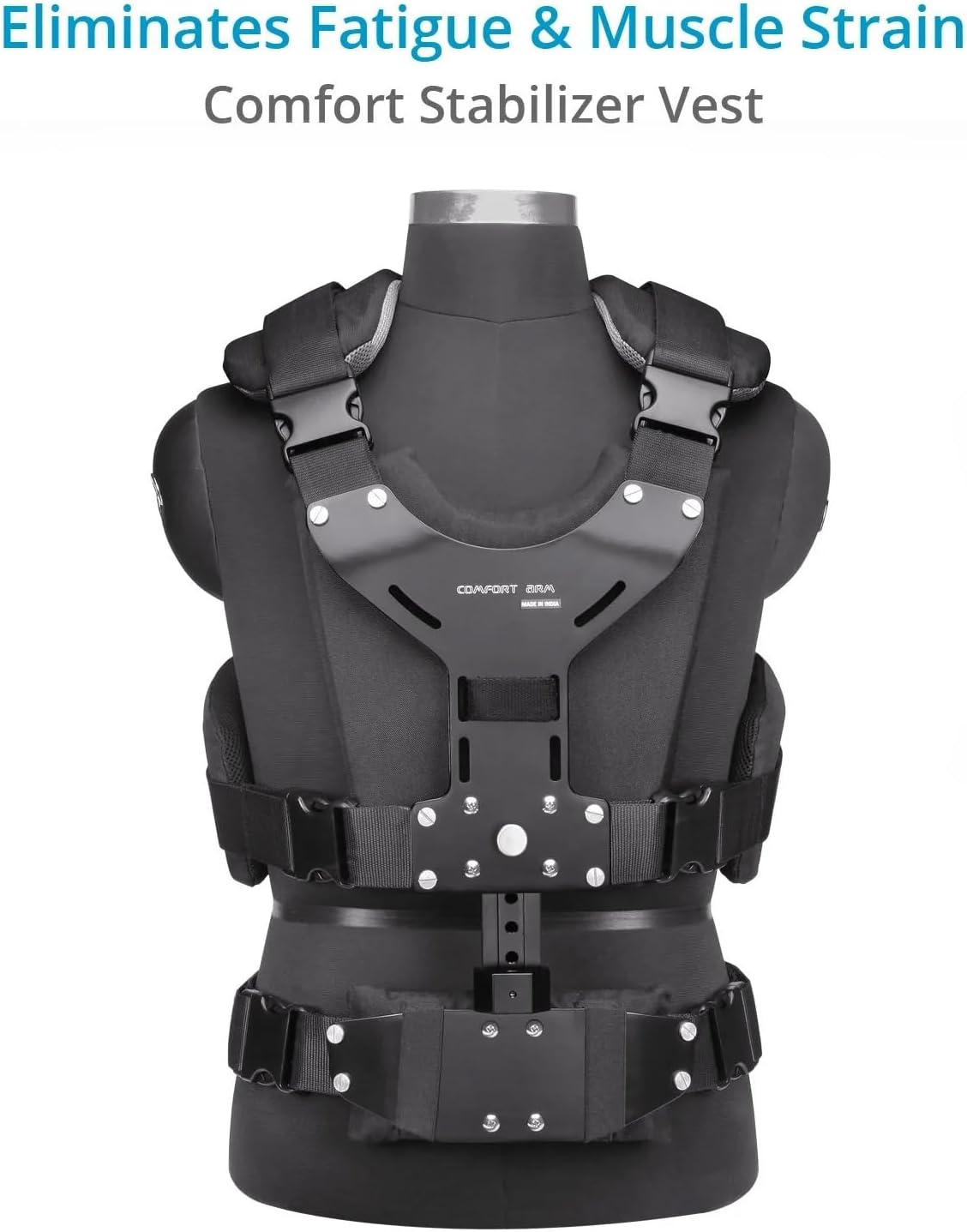
The Flycam Comfort Arm and Vest is the brand’s entry point into wearable support, and it’s aimed squarely at mirrorless and DSLR operators running moderate payloads. The manufacturer rates it at 11 lbs (approximately 5 kg), which is a realistic ceiling for a gimbal-plus-camera combo: a DJI RS 3 Pro carrying a Sony A7 IV with a 24–70mm f/2.8 lands close to that limit once you factor in the gimbal’s own body weight.
Here’s where the value proposition gets interesting. Operators who have adapted this system to carry a DJI Crane 2 Plus using a rotating plate report that the arm genuinely does what it promises—weight transfers to the vest, and the hand becomes a steering tool rather than a support structure. No Film School’s stabilizer guide reinforces this point: the ergonomic math changes completely when your torso absorbs the load. Reviewers consistently describe real, meaningful fatigue reduction across multi-hour documentary and event shoots.
The tradeoff to name explicitly: the Comfort Arm is a single-arm design, which means it provides less vibration damping than a dual-arm configuration. For fast-moving action or operators who work across uneven terrain, that matters. For slow push-ins, venue walkthrough shots, or interview coverage, it’s a non-issue.
By the numbers — Flycam Comfort Arm and Vest:
| Spec | Value |
|---|---|
| Rated payload | 11 lbs / ~5 kg |
| Arm type | Single spring arm |
| Best-fit payload | Mirrorless + gimbal, ~4–8 lbs |
| Operator profile | Solo documentary, event, ENG |
Flycam Galaxy Dual Arm and Vest: When the Load Goes Higher
The Flycam Galaxy Dual Arm and Vest steps up in every measurable dimension. The dual-arm architecture—two parallel spring arms instead of one—effectively doubles the damping surface and raises the rated payload to 22 lbs (approximately 10 kg). That’s enough headroom for a fully caged BMPCC 6K Pro, a heavier motorized gimbal like a Tilta Aries or a DJI RS 3 Pro with a cinema prime, plus accessories.
One detail that appears in owner accounts and that deserves emphasis: at least one reviewer with hands-on experience with a genuine SteadiCam system calls the Galaxy a compelling lightweight substitute for DSLR-class payloads. That’s not nothing. Tiffen’s SteadiCam Pilot and Flyer systems sit at multiples of the Galaxy’s price. For operators who need vest-and-arm support occasionally—not on every gig—the Galaxy’s value-to-capability ratio is difficult to argue against.
The dual arm also helps with dynamic shots. Because two arms share the load, sudden directional changes (turning corners, navigating stairs) produce less oscillation than a single arm at comparable payloads. PremiumBeat’s camera stabilization guide notes that arm stiffness and damping response are the two variables that separate budget vest arms from professional units in real-world movement scenarios—and the Galaxy’s dual configuration addresses both better than the Comfort Arm does.
That said, the Galaxy is heavier to wear than the Comfort Arm, and setup time increases. If your shoots are under two hours or you’re working alone with minimal crew support, the extra capability may not justify the added bulk.
The Loose Screw Problem: What Buyers Consistently Flag
Here’s the single most important pre-shoot ritual for either Flycam system, and it comes directly from across-the-board owner reports: check every screw before you attach a camera. Loose screws on arrival is the most consistent complaint across both the Comfort Arm and the Galaxy—not occasional, not isolated, but a pattern that shows up repeatedly in long-run buyer reviews. One reviewer issued an explicit warning: a loose connection at the arm’s camera-mount end can result in a dropped rig. On a $2,000+ gimbal-and-camera combo, that’s an unacceptable outcome.
The fix is straightforward and takes about ten minutes:
- Before first use, lay out both arms, the vest frame, and all hardware.
- Use the included Allen keys (and a torque driver if you have one) to work through every joint and bracket connection methodically.
- Apply a small amount of thread-lock compound (medium-strength, not permanent) to any screw that will bear load—arm joints, vest receiver, camera platform mount.
- Repeat this check after the first two or three deployments, because spring arms cycle through tension and can back out fasteners that initially felt tight.
StudioBinder’s camera movement guide recommends pre-shoot equipment checks as standard protocol for any mechanical support system—this is that principle applied specifically to where Flycam’s manufacturing tolerance shows its limits.
How to Decide: Comfort Arm vs. Galaxy vs. Renting a Pro System
This is the decision matrix that matters if you have a contract or project pending:
If your total rig weight (gimbal + camera + lens + accessories) is under 8 lbs and you shoot primarily seated, walking, or slow-movement scenarios: the Comfort Arm and Vest covers your use case. The 11-lb rating gives you real headroom; the single-arm design is sufficient for the movement profiles you’re running.
If your rig pushes 10–18 lbs, or you regularly work across two hours of continuous movement, or you’re shooting anything that involves faster directional changes: the Galaxy Dual Arm and Vest is the correct tier. The dual-arm architecture earns its price at those payloads.
If your rig exceeds 18 lbs (think: RED Komodo or BMPCC 6K with a proper cinema zoom, cage, follow focus, and a heavy 3-axis head), neither Flycam system is the right answer. At that payload, you’re in SteadiCam Zephyr or Tiffen Flyer territory—or you should be pricing a rental for the specific shoot. ProVideoCoalition’s buy-vs-rent framework for support systems suggests the crossover point for renting a professional vest system is roughly when the rental cost is under 15% of the purchase cost of the equipment you’d be protecting. A $200/day SteadiCam rental on a $3,000 camera rig doing one heavy shoot per quarter is almost always the better math than a $2,500 system purchase.
On waist and torso fit: both Flycam vests are designed to fit a range of adult torso sizes, but owner accounts consistently note that operators on the smaller end of medium (roughly 28–32” waist) or larger end of large (38”+ waist) find the fit less dialed than those in the middle range. If you’re outside that middle band, verify the sizing spec against your own measurements before committing.
Frequently Asked Questions
Can I use a vest-and-arm system to support a handheld gimbal instead of a traditional counterbalanced stabilizer? Yes—and operators are actively doing it. The arm doesn’t care whether what’s attached to it is a counterbalanced sled or a motorized gimbal. The rotating plate adapter approach (documented in owner reviews of the Comfort Arm with the DJI Crane 2 Plus) transfers load to the vest while preserving the gimbal’s electronic stabilization. You get both systems’ benefits simultaneously.
Do the Flycam vest systems arrive with loose screws and how do I fix it? Across multiple reviewers and product lines, loose screws on arrival is a consistent and documented pattern—not an edge case. The fix is a pre-use inspection of every joint, application of medium-strength thread-lock on load-bearing fasteners, and a repeat check after the first few deployment cycles. Build 15 minutes of prep time into any shoot that uses either system.
How does the Flycam Galaxy compare to a genuine SteadiCam system for DSLR payloads? At DSLR-class payloads (12–18 lbs), owners with experience on both systems describe the Galaxy as a credible lightweight alternative—not a replacement for the SteadiCam’s refined damping and balance control, but functionally competitive for operators who don’t need the SteadiCam’s balancing discipline or price point. For pure fatigue reduction and basic smooth movement, the Galaxy holds up.
What is the real weight limit of the Flycam Comfort Arm and Vest? The manufacturer rates it at 11 lbs. Owner reports suggest the arm is most comfortable and best-performing in the 5–9 lb range; pushing toward the 11-lb ceiling is possible but puts more stress on the arm joints and increases screw-creep risk. Build your rig weight assessment around your actual camera + lens + gimbal + accessories total, not just the camera body.
Is a vest-and-arm system worth it if I only shoot a few hours at a time? The honest answer is: probably not, if “a few hours” means two or under on flat terrain with a sub-6-lb rig. The setup overhead and learning curve only pay off when fatigue is actually degrading your work. If you’re shooting four or more hours continuously, or if your client work involves extended tracking shots, the fatigue math flips quickly.
What waist sizes do these vests actually fit comfortably? Owner reports cluster around a comfortable fit for roughly 30–38” waist. The vest adjustment range accommodates outside that band, but operators at the extremes report less secure, less comfortable fit. Flycam’s published sizing specs should be verified against your own measurements before purchase.
The Bottom Line
If your gimbal shoots are leaving you wrecked and your footage is degrading in the back half of the day, a vest-and-arm system is a legitimate fix—not a workaround. The Flycam Comfort Arm and Vest is the right starting point for mirrorless-class rigs under 8 lbs; the Flycam Galaxy Dual Arm and Vest handles heavier DSLR or cinema-adjacent builds up to around 18 lbs with more authority. Neither system ships in ready-to-shoot condition—plan for a pre-use screw inspection on every deployment. And if your rig weight or project cadence pushes past what either system is rated for, the rent-don’t-buy math is almost certainly in your favor.
Your next step: weigh your complete rigged setup—gimbal body, camera, lens, and any accessories—then use that number against the payload tiers above to land on the right system. If you’re right at a tier boundary, buy up.